How to Build a Personal Website with Claude Code (and Host It for Free)
You open your email, and there it is: the hosting renewal. Right behind it is a reminder that three plugins need updates, and one of them hasn’t been updated by its developer in a year. You didn’t want to run a website. You wanted to have one.
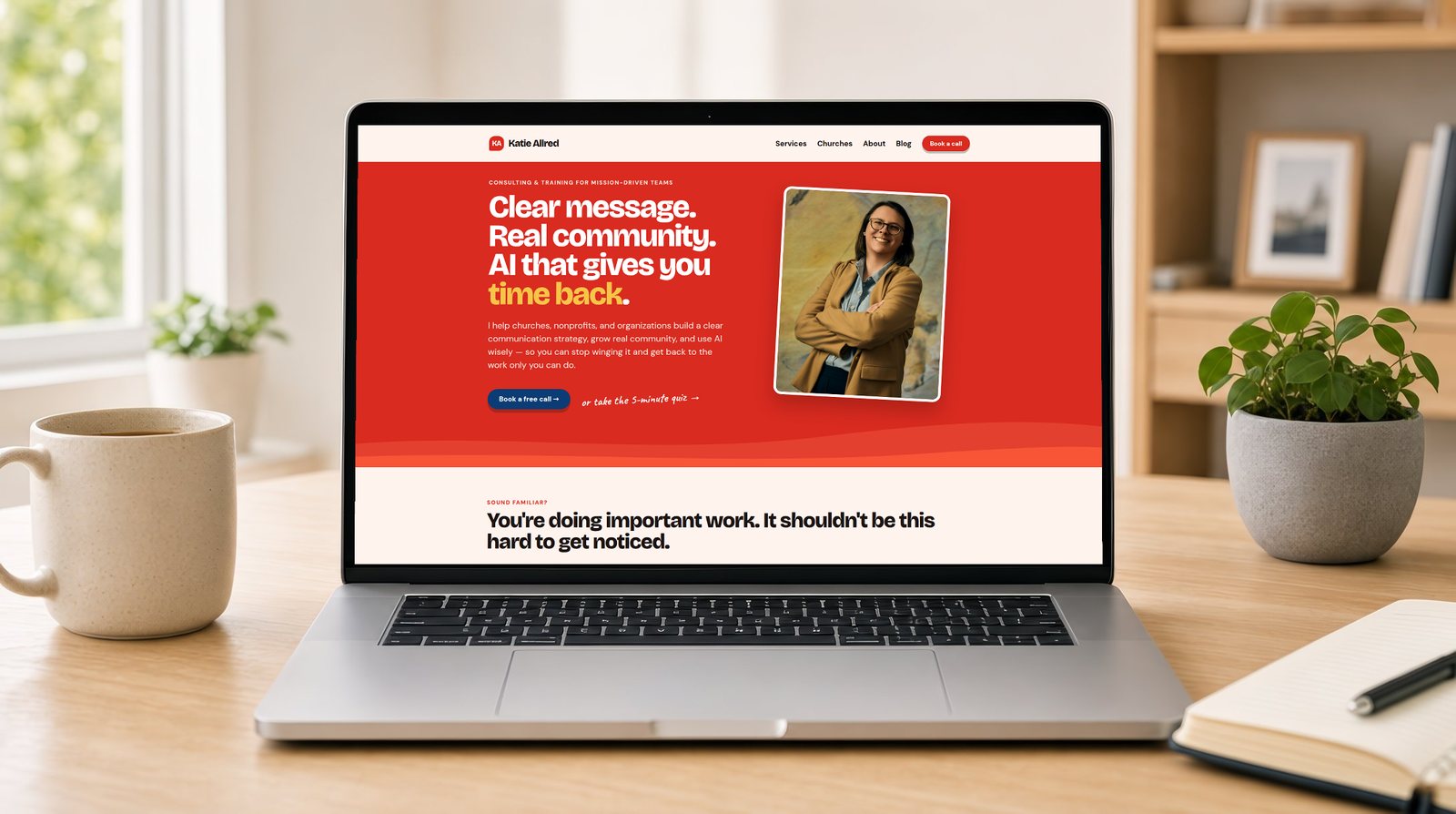
This month I moved my own website, the one you’re reading right now, off WordPress. I didn’t hire a developer, and I didn’t write the code myself. I described what I wanted to Claude Code, Anthropic’s AI coding tool, and it built the site. The site is hosted for free on GitHub Pages.
This post walks you through how I did it, step by step, with the prompts I used. I’ll also be honest about what it costs, where it gets tricky, and when you should stay right where you are.
What you’re actually building
Let’s start with a contrast: a dynamic site versus a static one.
WordPress is dynamic. Every time someone visits, a server runs code, asks a database for your content, and assembles the page on the spot. That’s why WordPress needs paid hosting, updates, and security plugins.
A static site is built ahead of time. Your pages are turned into plain HTML files once, when you publish, and those files are handed to visitors as-is. There’s no database to hack and nothing to update. Because the files are so simple, services like GitHub Pages will host them for free.
My site uses Jekyll, a free tool that turns simple text files into a full website. Each blog post is a Markdown file: a plain text file with a few lines of settings at the top (title, date, description) and the post underneath. Claude Code handles everything around those files: the templates, the design, the build, and the deploy.
Here’s what you need:
- A GitHub account (free). GitHub stores your site’s files and their full history, and GitHub Pages hosts it.
- Claude Code, which comes with a paid Claude plan. You can use it in a terminal, in the Claude desktop app, or on the web at claude.ai/code. I did almost all of my work in the app.
- A domain name (optional). You can use the free
yourname.github.ioaddress, or connect a domain you already own.
Is this right for you?
Before you start, a quick gut check. I write a lot about building sites with Divi on WordPress, and I still recommend it for many churches and small businesses. This approach isn’t better for everyone. It’s better for some people.
A static site built with Claude Code is a great fit if:
- You’re the main person who updates the site.
- It’s mostly pages and blog posts: a personal site, a speaker or author site, a portfolio, a small ministry or nonprofit site.
- You’re tired of paying for hosting and babysitting plugins.
- You’re curious about AI and willing to learn a few new words.
Stick with WordPress (or Squarespace, or Wix) if:
- Several volunteers or staff who aren’t comfortable with AI need to edit pages in a visual editor.
- You need an online store, member logins, or anything that has to run on a server.
- You depend on a specific plugin that has no equivalent elsewhere.
If you’re in the first list, keep reading.
Step 1: Set up GitHub and Claude Code
First, create a free account at github.com. Then create a new, empty repository. A repository (or “repo”) is just a folder that remembers every change you’ve ever made. Give it a simple name like website.
I recommend making the repository public. GitHub Pages is free for public repositories on a free account, and a public repo means anyone can see your site’s source files. That’s fine, because it’s a public website anyway. My whole site is at github.com/katiejallred/personal if you want to peek. It does mean one rule is non-negotiable: never put passwords, API keys, or private information in the repo.
Next, open Claude Code and connect it to your GitHub account so it can read and change your new repository. On the web, it walks you through this the first time you start a session.
Step 2: Describe the site you want
This is the part that surprised me most. You don’t start with code. You start with a clear description, the same way you’d brief a designer.
Here’s the kind of first prompt I recommend:
Set up a Jekyll website in this repository for my personal site and blog.
I'm Katie Allred, a community strategist, AI educator, and author.
I need: a home page, an About page, a Contact page, and a blog with
posts listed newest first. Keep it simple and fast. Deploy it to GitHub
Pages with GitHub Actions. Explain what you set up in plain English
when you're done.
Claude Code will create the files, test that the site builds, and open a pull request. A pull request is a proposed change you can review before it goes live. Read the summary, look over what changed, and when you’re happy, click Merge. That’s your approval.
If you’ve read my post on the art of the prompt, you know the rule: clear beats clever. Tell it who you are, who the site is for, and what “done” looks like.
Step 3: Turn on free hosting with GitHub Pages
Once that first pull request is merged, go to your repository on GitHub and open Settings → Pages. Under Build and deployment, set Source to GitHub Actions.
That’s it. From now on, every change you merge is built and published automatically, usually within a couple of minutes. Your site will be live at https://yourusername.github.io/website/.
If something fails, open the Actions tab, click the failed run, and paste the error into Claude Code with “This deploy failed. What happened, and can you fix it?” It will read the error, explain it, and push a fix.
Step 4: Bring over your existing content
If you’re starting fresh, skip ahead. If you already have a blog, this step alone is worth the whole project.
In WordPress, go to Tools → Export, download the file, and add it to your repository (or give it to Claude Code in the chat). Then ask:
This is my WordPress export. Convert every published post to a Jekyll
post in _posts/. Keep each post's original URL so old links still
work. Bring over the title, date, categories, tags, featured image,
and SEO description. Download the images into the repo and update the
links to point at them.
That’s how I moved 96 posts and their images over in a single pull request. Keeping the original URLs matters. Every link people have shared over the years, and every search result pointing to your old posts, keeps working.
Then do the boring but important cleanup. I asked Claude Code to find broken links, add missing alt text to images, write meta descriptions for the posts that didn’t have one, and shrink oversized images. Each of those was one plain-English request.
Step 5: Make it look like you
A new site will look generic until you give it your brand. If you have brand colors, fonts, and a logo, share them. The more specific you are, the better it gets.
My brand already had a small design system: my colors, my fonts, my buttons, and the wavy shapes you see around the site. I gave that to Claude Code and asked it to use those design tokens everywhere. Then I went page by page:
Redesign the Services page using the design system. Lead with who I
help and the problem I solve, then the three services as cards, then
reviews, then a clear button to book a call. Make sure it works on a
phone.
Always check the result on your phone, not just your laptop. Most of your visitors will be on one.
Step 6: Connect your own domain
Using a custom domain is optional, but it makes your site feel like yours. Buy a domain from any registrar (or use one you already own), then:
- In Settings → Pages, type your domain under Custom domain and save.
- At your registrar, add the DNS records GitHub shows you. GitHub’s custom domain guide lists them, and Claude Code can walk you through your registrar’s screens.
- Once GitHub confirms the domain, tick Enforce HTTPS. The security certificate is free.
DNS changes can take a few hours to kick in. Don’t panic if it doesn’t work right away.
Step 7: Keep a notes file for Claude
This is my favorite tip, and it’s the one most people miss.
Claude Code reads a file called CLAUDE.md at the start of every session. Think of it as the onboarding binder you’d hand a new staff member. Mine explains how the site is organized, which design tokens to use, how my Amazon affiliate links work, and a few house rules, like “give every new post a description” and “never commit secrets.”
Ask Claude Code to write it for you:
Write a CLAUDE.md for this repository that explains how the site is
put together and the conventions to follow, so a future session can
pick up where we left off.
Every time you settle on a new rule, ask it to add the rule to the file. Your future self, and every future session, will thank you.
What I added along the way
Once the basics are live, the fun begins. Each of these was a single request, reviewed and merged as its own pull request:
- Search and AI visibility. Every page now carries structured data that tells Google and AI search tools who I am, what I’ve written, and how my pages connect.
- Automatic share images. When a page doesn’t have a photo, the site draws a branded share card for it, so links look good on social media.
- Instant search engine updates. The site pings search engines through IndexNow every time I publish. I wrote a whole post on why IndexNow matters for church websites.
- Forms without a server. My contact form and quiz are Tally embeds, and my email signups use SendFox forms. A static site can’t store form responses itself, so let a form tool do it.
- Affiliate links on autopilot. Any Amazon link gets my Associates tag and the required disclosure automatically.
- Privacy-friendly fonts. Fonts are served from my own site instead of Google’s servers.
- Posts that publish themselves. I can write posts ahead of time with a future date, and the site rebuilds every morning so they go live on schedule.
None of this required me to know how it works under the hood. I needed to know what I wanted and why.
What it costs
Let’s be clear about the money, since “free” gets thrown around a lot.
- Hosting: free with GitHub Pages. It has limits (roughly 1 GB of files and 100 GB of traffic a month), and a personal site or blog is very unlikely to come close.
- Security certificate (HTTPS): free.
- Claude Code: included with a paid Claude plan. If you already pay for Claude, you may already have it.
- Domain name: whatever your registrar charges each year, or nothing if you use the github.io address.
The real savings aren’t only in dollars, though. They’re in the hours you no longer spend updating plugins, restoring backups, and wondering whether the site is secure.
Lessons I learned the hard way
Make one change at a time. “Redesign the whole site” gets you a mess. “Redesign the contact page” gets you a great contact page. Small pull requests are easy to review and easy to undo.
Look before you merge. Claude Code is very good, but you’re still the editor. Read the summary, click through the preview, and ask questions. “Why did you change this?” is always a fair question.
Say what you want, not how to do it. You don’t need to know the technical fix. “The headshot on the home page cuts off the top of my head on phones” is a perfect bug report.
Keep it public, keep it clean. A public repository is free and transparent. That’s exactly why private information never goes in it.
Start small, but start
You don’t have to rebuild everything this weekend. Start with one page: an About page and a way to contact you. Get it live on the free github.io address. Then add your blog, then your brand, then your domain.
The first time you merge a pull request and watch your change go live two minutes later, something clicks. You’re not stuck waiting on a developer or a plugin update anymore. You’re the one steering.
That’s what I love about tools like this. They take care of the temporary, technical parts, so you can spend your time on the people you’re trying to reach and the message you want them to hear.
If you’d like help planning your own site, or you’re trying to decide between this and WordPress, you can book a time with me.
Frequently asked questions
Do I need to know how to code to build a website with Claude Code?
No. You describe what you want in plain English and Claude Code writes the code, runs it, and explains what it changed. It helps to learn a few words like repository, commit, and pull request, but you do not need to write code yourself.
Is GitHub Pages hosting really free?
Yes. GitHub Pages hosts static websites for free from a public GitHub repository, including free HTTPS. It has usage limits (about 1 GB of site files and 100 GB of traffic a month), which a personal site or blog is unlikely to reach.
What does it cost to build a website with Claude Code?
Hosting on GitHub Pages is free. Claude Code needs a paid Claude plan, and a custom domain name costs whatever your registrar charges each year. You can skip the domain and use the free github.io address.
Can I move my WordPress blog to a site built with Claude Code?
Yes. Export your content from WordPress (Tools, then Export), give the file to Claude Code, and ask it to convert every post to Markdown with its images and original URLs. I moved 96 posts from WordPress this way.
Can I have a contact form or email signup on a static site?
Yes, through a form service. A static site has no server of its own, so you embed a form from a tool like Tally, or a signup form from your email platform, and the responses are stored there.
When should I stick with WordPress instead?
Stay with WordPress if several non-technical people need to edit the site in a visual editor, or if you need a store, member logins, or plugins that run on a server. A static site is best when one person, or a small team comfortable with AI help, keeps it up to date.